
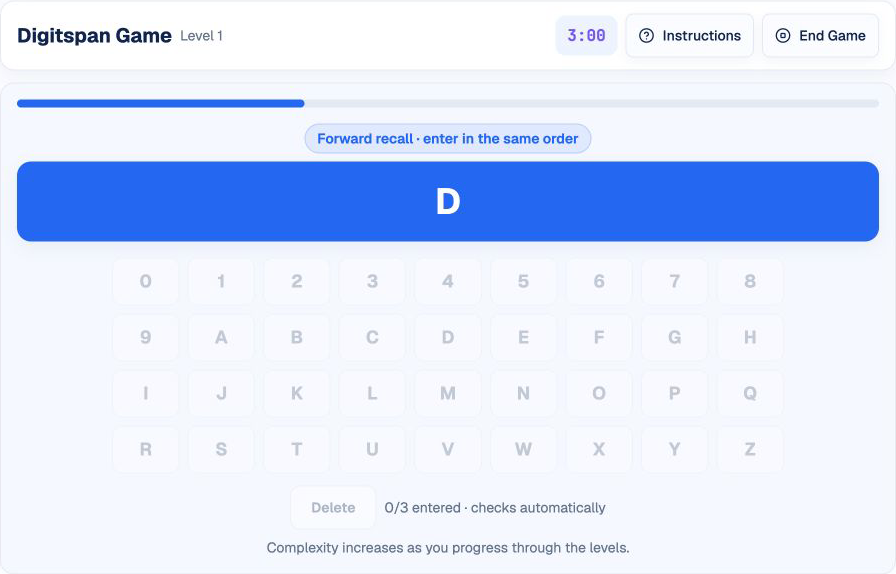
Digitspan tests a simple instruction under increasing memory load: watch each character, hold the complete sequence, and reproduce it in the required order. The challenge comes from the one-at-a-time presentation, the mix of numbers and letters, and the timer continuing while sequences become longer.
This guide follows HireVueGames' independent Digitspan practice. Repeated practice cannot guarantee an employer outcome, but it can make the character keyboard and recall cycle familiar and help you discover which memory method works reliably for you.
What Is the HireVue Digitspan Game?
Digitspan is a timed short-term memory task. A sequence of numbers and uppercase letters appears one character at a time. After the final character disappears, the keyboard becomes active and you enter the sequence.
Sequences start short and grow as you progress. Levels 1 through 5 use forward recall: enter the characters in the same order they appeared. Level 6 introduces backward recall, and later levels alternate between backward and forward recall. The direction displayed for the current level is always authoritative.
What Skills Does Digitspan Practice?
- Short-term memory: retaining a sequence long enough to reproduce it.
- Attention and concentration: encoding every character without missing a transition.
- Sequential recall: preserving order rather than remembering only the set of characters.
- Cognitive control: resisting the urge to enter characters before presentation ends.
- Performance under pressure: recalling accurately while the three-minute timer runs.
These are practice demands, not official employer scoring categories.
How the Digitspan Game Works
The game uses one three-minute overall timer; there is no separate timer for an individual level. A progress indicator advances as each character appears. During presentation, the keyboard is disabled. Once the sequence finishes, the keyboard becomes active.
The instruction indicates whether the level requires forward or backward recall. Enter the complete sequence and use Delete to correct an input mistake. The game checks the answer automatically when the required number of characters has been entered, so there is no Submit button. Sequence length and recall complexity increase as you progress.
1. Read the Recall Direction
Confirm whether the instruction asks for forward or backward recall. Do not rely on the previous level's rule.
2. Encode Each Character
Watch the central display and give each character a clear mental label. Avoid shifting attention to the keyboard while the sequence is still appearing.
3. Hold the Ordered Sequence
Use a short rehearsal or chunking method to keep the complete order active. For backward recall, retain the original sequence first and reverse it only after presentation ends.
4. Reproduce It on the Keyboard
Enter the sequence once the keys activate. Check the required direction, and use the Delete button if you press the wrong character before the automatic check.
A Repeatable Digitspan Strategy
Chunk Longer Sequences
Group a sequence into two- or three-character units. 7 K 2 B 9 may be easier to hold as 7K and 2B9 than as five unrelated items. Keep the original order between chunks.
Use Silent Rehearsal
Repeat the sequence internally as it grows: first 7, then 7-K, then 7-K-2. Stop adding once presentation ends and enter the stored sequence.
Create a Visual Trace
If verbal rehearsal is distracting, imagine the characters written in a row. Numbers and letters can also be anchored to familiar keyboard positions, but do not look away from the display to locate them prematurely.
Separate Similar Characters
Give extra attention to characters that are easy to confuse, such as 0 and O, or repeated items in nearby positions. A brief mental label like “zero” can reduce ambiguity.
Enter at a Controlled Pace
The response stage rewards accurate order. Enter deliberately, use Delete when necessary, and remain aware of the overall timer.
Common Digitspan Mistakes
Watching the Keyboard Too Early
Looking for keys during presentation divides attention and can cause you to miss the next character.
Remembering Characters Without Their Order
Digitspan is sequential. Chunking must preserve the position of every item, not merely the collection of characters.
Using Chunks That Are Too Large
One long group offers little advantage. Break longer sequences into units you can repeat without effort.
Carrying the Previous Sequence Forward
Clear the old sequence after feedback. Begin every level with an empty mental workspace.
Assuming Every Level Uses Forward Recall
Levels 1 through 5 use forward recall. From level 6 onward, backward and forward recall alternate. The displayed instruction is authoritative, so check it before encoding the sequence.
A Practical Digitspan Training Routine
Round 1: Find Your Encoding Method
Compare silent rehearsal with visual grouping. Choose the method that produces the most stable short-sequence accuracy.
Round 2: Stabilize Longer Sequences
Use consistent chunk sizes as sequences grow. Note whether errors occur at the beginning, middle, or end.
Round 3: Improve Input Control
Keep your encoding method and focus on deliberate keyboard entry. Avoid turning a correct memory into an input mistake.
Understanding Your Digitspan Practice Results
- Accuracy shows how often the entire sequence and order were correct.
- Sequence length identifies the memory load associated with each attempt.
- Average response time reflects keyboard entry after presentation, not the fixed display time.
- Incorrect sequences can reveal omissions, substitutions, or order errors.
Look for repeatable performance across several rounds. One successful long sequence is less informative than stable accuracy at the same length. Practice results help you choose a training focus; they do not predict an employer's decision.
Practice the Digitspan Format
Use Digitspan practice to learn the presentation-input-feedback cycle and test your preferred recall method.
Related memory and attention formats include the Flashback guide, Numerosity guide, and Singularity guide.
Disclaimer: HireVueGames is an independent preparation platform and is not affiliated with, endorsed by, or operated by HireVue. This guide describes independent practice and does not reproduce HireVue's proprietary questions, adaptive logic, scoring model, or employer evaluation process. It is not an official HireVue assessment, exact replica, or score prediction tool.
Related Guides
Flashback Guide
Improve visual memory, comparison accuracy, and response control.
Read GuideNumerosity Guide
Learn how to approach numerical reasoning and timing pressure.
Read GuideSingularity Guide
Build a calmer scan path for outlier detection and visual processing.
Read Guide