
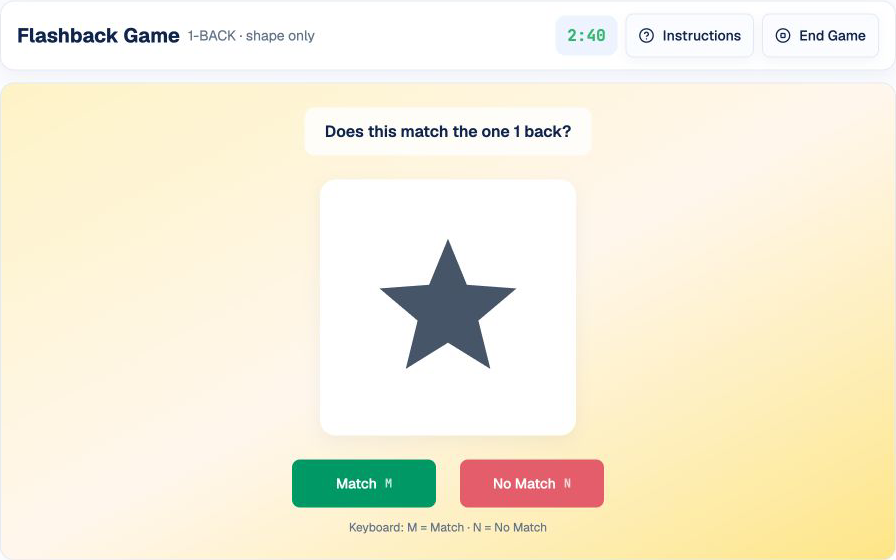
Flashback asks you to maintain and update a continuous sequence of shapes. As the n-back distance grows, you must compare the current item with the correct earlier position without losing track of the items in between. Harder rounds can add color to the matching rule.
This guide explains HireVueGames' independent Flashback practice. Repetition cannot guarantee an employer result, but it can make the memory-comparison cycle familiar and help you build a consistent way to encode visual details under time pressure.
What Is the HireVue Flashback Game?
Flashback is a timed visual working-memory task built around the n-back rule. A sequence of patterns appears, and you decide whether the current pattern matches the one shown a specified number of steps earlier.
Early levels begin with 1-back, which compares the current shape with the immediately previous one. Later levels can introduce 2-back, 3-back, and a shape-and-color rule. Read the instruction before every level because both the memory distance and matching rule can change.
What Skills Does Flashback Practice?
- Working memory: retaining a visual pattern after it leaves the screen.
- Visual recall: remembering the order, shape, and—when required—color of recent items.
- Attention to detail: noticing whether the current item satisfies every active matching rule.
- Concentration: repeating the encode-compare-decide cycle without losing focus.
- Decision speed: choosing Match or No Match while the overall timer runs.
These labels describe independent practice demands, not official employer score categories.
How the Flashback Game Works
The game presents a continuous sequence of shapes. Before each level, it states the current n-back rule. For 1-back, compare the current shape with the previous one. For 2-back, compare it with the shape shown two steps earlier; higher levels can extend the same principle.
Choose Match when the current item satisfies the level's rule for the required earlier position. Choose No Match when the shape differs, or when the color differs during a shape-and-color level. Difficulty increases as the memory distance and number of tracked features grow.
1. Read the N-Back Rule
Confirm how many steps back the comparison requires before the sequence begins.
2. Encode Each Pattern
Name the shape and, when color is active, the color. Keep the label compact enough to update as every new item appears.
3. Maintain a Mental Queue
Hold the last n patterns and update the queue whenever a new shape appears. Discard the oldest pattern only after making the required comparison.
4. Compare and Respond
Compare the current pattern with the correct earlier position, then choose Match or No Match. Do not compare only with the most recent pattern when the rule is 2-back or higher.
A Repeatable Flashback Strategy
Encode the Active Features
For a shape-only level, store the shape and ignore color. For a shape-and-color level, bind both features into one short label, such as “blue star.”
Use a Fixed Feature Order
Use the same order every time: identify the shape first, then add color only when the level requires it. A fixed encoding order reduces hesitation.
Verbalize Distinctive Details
Translate each item into a short label. This creates an additional memory trace without requiring you to hold an undefined visual impression.
Decide on the First Confirmed Difference
One real change is enough for No Match. Once you confirm it, additional checking adds time without changing the decision.
Keep Match and No Match Equally Plausible
Do not assume a long run of matches must be followed by a non-match. Evaluate every current pattern against the correct n-back position.
Common Flashback Mistakes
Tracking Color When It Is Not Required
Extra features consume working-memory capacity. Follow the displayed rule and track color only when the level requires both shape and color.
Comparing the Overall Impression
A near-match is designed to feel familiar. Check specific features instead of relying only on familiarity.
Overloading Working Memory
Trying to preserve irrelevant detail can crowd out the sequence itself. Keep each mental label limited to the active matching features.
Continuing to Search After Finding a Difference
Once one confirmed difference appears, choose No Match. Further comparison wastes response time.
Forgetting the Current N-Back Rule
Comparing only with the previous shape is incorrect during a 2-back or 3-back level. Keep the stated memory step active throughout the sequence.
A Practical Flashback Training Routine
Round 1: Build a Feature Checklist
Prioritize accuracy and use the same scan order for every pattern.
Round 2: Add Compact Labels
Test short shape labels, then add color labels when the level requires them. Avoid sentences that are too long to update.
Round 3: Reduce Unnecessary Rechecking
Respond as soon as all key features match or one confirmed difference appears. Preserve accuracy while shortening indecision.
Understanding Your Flashback Practice Results
- Accuracy shows how often Match and No Match decisions were correct.
- Average response time measures how quickly you make each n-back comparison.
- Results by n-back level can reveal where increasing memory load begins to reduce accuracy.
- Incorrect attempts help distinguish missed differences from false alarms.
Review several rounds before changing your method. If non-matches cause most errors, improve feature coverage. If matches are slow, reduce repeated checks after the main features agree. These results support practice decisions; they do not predict an employer outcome.
Practice the Flashback Format
Use Flashback practice to apply the encode-update-compare routine with a continuous visual sequence.
Related formats include the Digitspan guide, Singularity guide, and Shapedance guide.
Disclaimer: HireVueGames is an independent preparation platform and is not affiliated with, endorsed by, or operated by HireVue. This guide describes independent practice and does not reproduce HireVue's proprietary questions, adaptive logic, scoring model, or employer evaluation process. It is not an official HireVue assessment, exact replica, or score prediction tool.
Related Guides
Digitspan Guide
Use memory routines and cleaner recall habits for sequence-style tasks.
Read GuideSingularity Guide
Build a calmer scan path for outlier detection and visual processing.
Read GuideShapedance Guide
Practice visual matching, orientation, and pattern rules with less guesswork.
Read Guide