Portrait differs from a cognitive game because it does not ask you to calculate, memorize, or find one factual solution. It presents two alternatives and asks which one better reflects your usual work style.
This guide follows HireVueGames' independent Portrait practice. Familiarity cannot determine an employer result, but it can reduce uncertainty around the forced-choice format and help you answer more consistently and authentically.
What Is the HireVue Portrait Game?
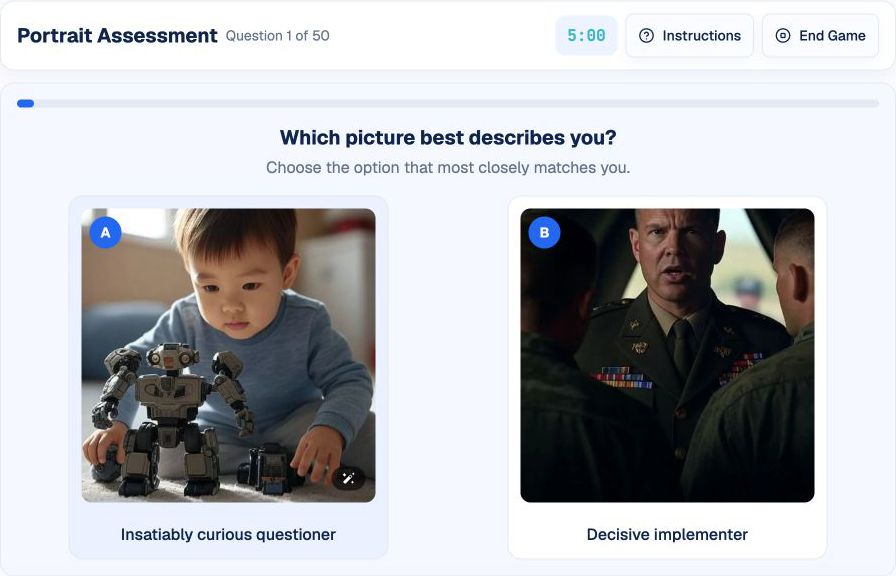
Portrait is a picture-based personality and work-style assessment. Each question displays two images, sometimes with short descriptions. Select the option that more closely represents how you usually think, behave, or prefer to work.
The forced-choice format means neither option may describe you perfectly. The task is to identify the closer fit. Assessment packages may use different pictures, wording, question counts, timing, and scoring models.
What Does Portrait Explore?
- Work-style preferences: how you naturally approach tasks and collaboration.
- Behavioral tendencies: patterns in how you respond to workplace situations.
- Self-awareness: your ability to recognize your usual preferences.
- Decision consistency: whether choices form a coherent picture across questions.
- Role context: how your authentic tendencies may relate to a particular work environment.
These are general interpretations of the format, not a list of official employer score categories.
How the Portrait Game Works
The independent practice lasts five minutes and includes approximately 50 questions. A randomized sequence of picture pairs appears one question at a time. Choose option A or B, and the next pair loads immediately. A progress bar shows how far you have moved through the available questions.
There is no Correct or Incorrect feedback in this practice because the choices describe preferences. The result history records your selections and response pace but does not produce an official personality profile or employer-fit score.
1. Review Both Options
Look at the picture and any description before deciding. Avoid selecting from color or visual appeal alone.
2. Use Your Usual Work Behavior
Think about how you typically act across ordinary professional situations, not a single exceptional day.
3. Choose the Closer Fit
When neither option is exact, select the one that is more representative rather than searching for a perfect answer.
4. Continue Without Rewriting Your Story
Answer each pair on its own terms while staying grounded in the same real work style.
How to Approach Portrait Authentically
Research the Role for Context
Understand the responsibilities, collaboration style, and working environment. This helps you interpret what a picture may represent, but it should not replace honest self-assessment.
Use Repeated Behavior, Not Aspiration
Choose based on what you regularly do rather than what sounds admirable. Concrete examples from previous work are more reliable than an imagined ideal profile.
Keep a Stable Frame of Reference
Answer from the perspective of your normal professional behavior. Switching between personal, social, and idealized work identities can create unnecessary inconsistency.
Trust a Clear First Preference
If one option is clearly closer, select it. Extended speculation about hidden scoring rarely adds useful information.
Accept Trade-Offs
Forced-choice questions may place two positive traits against each other. Choosing one does not mean rejecting the other; it indicates which is more characteristic in that comparison.
Common Portrait Mistakes
- Trying to reverse-engineer every question: increases hesitation without revealing the scoring model.
- Choosing visually attractive images: ignores the behavior represented by the option.
- Inventing an ideal personality: can produce conflicting choices.
- Using rare exceptions: misrepresents usual work behavior.
- Assuming there is one universally desirable profile: roles and employers can value different tendencies.
A Practical Portrait Preparation Routine
Step 1: Reflect on Real Examples
Recall how you normally plan, collaborate, decide, respond to pressure, and handle change.
Step 2: Learn the Forced-Choice Format
Complete one practice round without trying to optimize a score. Focus on interpreting each comparison.
Step 3: Review Hesitation
Identify pairs that took unusually long. Ask which real workplace example would clarify the closer preference.
Understanding Your Portrait Practice Results
Portrait practice results mainly show completion and response pace. Because the independent version has no correct answer, accuracy should not be interpreted as personality quality or job fit.
Use the history to notice excessive hesitation or inconsistent interpretation of the format. Do not use it to construct a supposedly perfect profile; HireVueGames does not reproduce an employer's personality model.
Practice the Portrait Format
Use Portrait practice to become familiar with picture-pair decisions and reflect on your usual work preferences.
Related behavioral formats include the PortraitXT guide, Teamchat guide, and E-Motions guide.
Disclaimer: HireVueGames is an independent preparation platform and is not affiliated with, endorsed by, or operated by HireVue. This guide describes independent practice and does not reproduce HireVue's proprietary questions, personality model, scoring system, or employer evaluation process. It is not an official HireVue assessment, exact replica, or score prediction tool.
Related Guides
PortraitXT Guide
Approach statement ratings consistently and authentically.
Read GuideTeamchat Guide
Read workplace context and choose constructive responses.
Read GuideE-Motions Guide
Use a repeatable method to compare facial-expression cues.
Read Guide