
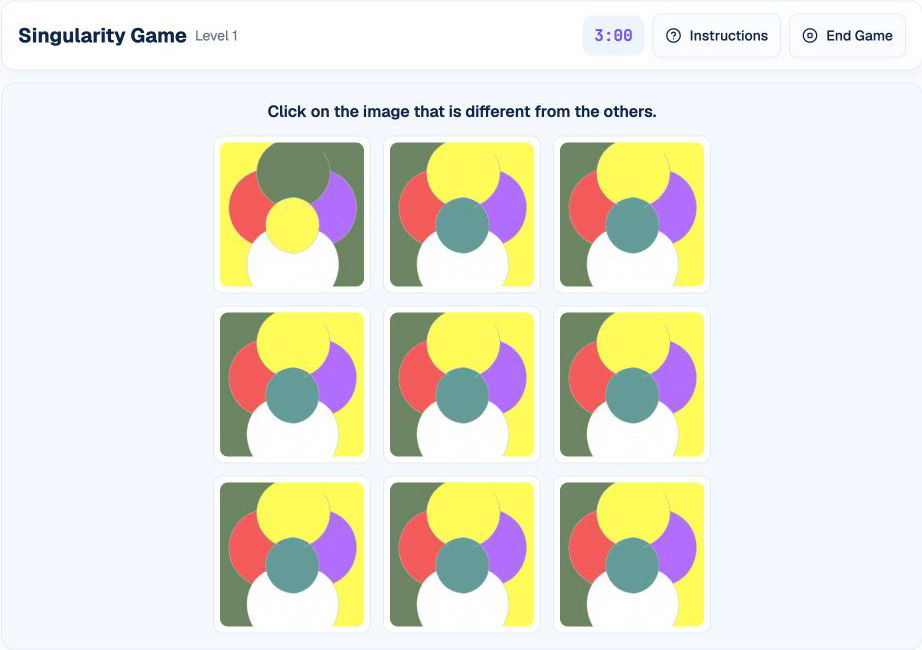
Singularity presents many nearly identical images and asks you to find the one exception. The challenge is not only noticing a difference; it is covering the grid quickly without skipping a corner, repeatedly checking the same area, or clicking on a weak first impression.
This guide follows HireVueGames' independent Singularity practice. Familiarity cannot guarantee an employer result, but it can help you develop a reliable visual search method before facing the format under time pressure.
What Is the HireVue Singularity Game?
Singularity is a timed visual processing task. Every grid contains one unique image and multiple copies of a common image. Select the unique item to complete the level.
Difficulty increases as you progress. Grids can grow from layouts such as 3×3 to 4×4 or 5×5, while the difference between the unique image and the repeated pattern becomes more subtle.
What Skills Does Singularity Practice?
- Attention to detail: finding a small inconsistency in a repeated pattern.
- Visual processing speed: comparing many items within a limited period.
- Focus: sustaining attention through consecutive grids.
- Search organization: covering the full grid without duplication or omission.
- Decision control: confirming an anomaly before clicking.
These describe the task demands of independent practice, not official employer scoring categories.
How the Singularity Game Works
The timed game displays a grid of repeated images with one unique item. Click the unique image to complete the level. As levels progress, the grid grows and the visual difference can become harder to detect. Performance depends on completing as many levels as possible while maintaining accuracy.
1. Take in the Whole Grid
Begin with a broad view. A disrupted visual rhythm may make the unique image stand out before deliberate scanning is necessary.
2. Switch to a Fixed Scan
If nothing stands out, scan row by row or column by column. Compare neighboring images rather than restarting from a random point.
3. Confirm the Difference
Check one structural feature—shape, color, internal detail, or orientation—to ensure the candidate is genuinely unique.
4. Select and Reset
Click once, review the brief feedback, and begin the next grid with a fresh broad view.
A Repeatable Singularity Strategy
Look for Broken Repetition
Instead of studying every image independently, identify the common visual pattern. The unique item is the one that breaks it.
Use Peripheral Vision First
A relaxed, broad gaze can detect a strong anomaly quickly. Use detailed inspection only when the difference is subtle.
Divide Large Grids Into Sections
Treat a large grid as smaller blocks. Finish one block before moving to the next so no area is missed.
Compare Neighbors
When several items look suspicious, compare each candidate with adjacent images. The repeated image establishes the baseline.
Trust Evidence, Not Urgency
Speed matters, but an unconfirmed click records an error immediately. Take one short verification step before submitting.
Common Singularity Mistakes
- Random scanning: creates missed cells and repeated checks.
- Focusing too narrowly at the start: prevents an obvious anomaly from standing out.
- Mistaking orientation for uniqueness: verify whether rotation is part of the common pattern.
- Clicking the first visually loud item: color or position may attract attention without being the real difference.
- Replaying the previous error: feedback is brief; reset when the new grid appears.
A Practical Singularity Training Routine
Round 1: Build Complete Coverage
Use a fixed scan path and prioritize correct selections.
Round 2: Add Broad-View Detection
Allow a short whole-grid glance before beginning the systematic scan.
Round 3: Improve Verification Speed
Confirm one decisive feature rather than repeatedly comparing the entire image.
Understanding Your Singularity Practice Results
- Accuracy shows how often you selected the unique image.
- Completed grids shows how many decisions you made during the round.
- Average response time measures the pace of visual search.
- Grid-size results can reveal whether larger layouts reduce coverage or accuracy.
High accuracy with few completed grids suggests slow verification. More grids with falling accuracy suggests premature clicking. Use several rounds to judge a trend; independent practice results do not predict an employer decision.
Practice the Singularity Format
Use Singularity practice to apply the broad-view, fixed-scan, confirm routine.
Related visual formats include the Shapedance guide, Puzzle guide, and Flashback guide.
Disclaimer: HireVueGames is an independent preparation platform and is not affiliated with, endorsed by, or operated by HireVue. This guide describes independent practice and does not reproduce HireVue's proprietary questions, adaptive logic, scoring model, or employer evaluation process. It is not an official HireVue assessment, exact replica, or score prediction tool.
Related Guides
Shapedance Guide
Practice visual matching, orientation, and pattern rules with less guesswork.
Read GuidePuzzle Guide
Practice picture recall and systematic sliding-tile reconstruction.
Read GuideFlashback Guide
Improve visual memory, comparison accuracy, and response control.
Read Guide