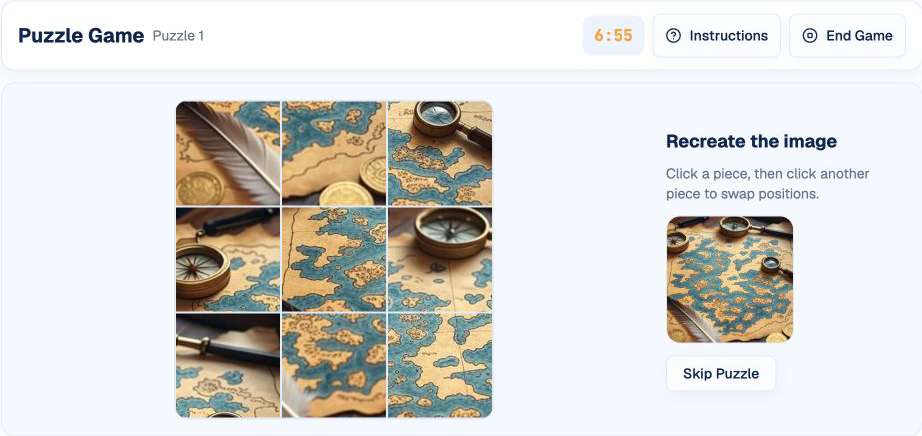
The Puzzle game combines a short memorization period with a spatial reconstruction task. You first see a complete picture, then rebuild it from scrambled square pieces while the overall timer continues.
This guide follows HireVueGames' independent Puzzle practice. Familiarity cannot guarantee an employer outcome, but it can help you use the preview effectively, understand the two-piece swap interaction, and solve the image with fewer random moves.
What Is the HireVue Puzzle Game?
Puzzle, sometimes called Puzzlepicture, is a timed visual memory and problem-solving task. The complete target appears briefly, then it is divided into nine square pieces and scrambled on a 3×3 grid.
Select any two pieces to swap their positions and reconstruct the original image. After completing one picture, the practice moves to a new image while the seven-minute session timer continues.
What Skills Does Puzzle Practice?
- Working memory: retaining the overall image after the preview.
- Visual processing: interpreting color, edges, objects, and composition.
- Spatial reasoning: mapping each piece to a grid position.
- Problem-solving: choosing an efficient reconstruction order.
- Attention to detail: distinguishing similar pieces and boundaries.
These describe practice demands rather than official employer scoring dimensions.
How the Puzzle Game Works
The target image appears for five seconds before its pieces are scrambled. Select one piece and then another to swap them; continue until every piece returns to its correct position.
The current practice uses a 3×3 grid and one overall seven-minute timer. A small reference image remains available during reconstruction, so use it to confirm uncertain boundaries rather than swapping at random.
1. Encode the Whole Picture
During the preview, identify the main subject, dominant colors, strong boundaries, and corner content.
2. Find Anchor Pieces
Start with pieces containing distinctive objects, corners, or high-contrast edges.
3. Build Sections
Reconstruct one row, one column, or one recognizable region rather than swapping pieces randomly.
4. Verify Boundaries
Check whether lines, colors, and objects continue naturally across neighboring tile edges.
A Repeatable Puzzle Strategy
Use the Five-Second Preview Deliberately
Scan center, corners, and edges. A simple structural map is more useful than trying to memorize every pixel.
Place Distinctive Tiles First
Faces, text, bright objects, and unique corners have fewer plausible positions and can anchor surrounding pieces.
Follow Continuous Features
Use horizons, outlines, color bands, and object edges to join neighboring tiles.
Swap with a Clear Purpose
Before selecting the second piece, know which two positions you want to exchange. Direct swaps let you preserve completed regions instead of disturbing them with unnecessary moves.
Recheck Similar Areas Last
Sky, walls, or repeated textures may be ambiguous. Solve more distinctive regions first so fewer positions remain.
Common Puzzle Mistakes
- Trying to memorize every detail: overwhelms the short preview period.
- Ignoring corners and edges: loses the easiest positional anchors.
- Random swapping: creates movement without reducing uncertainty.
- Looking only at tile centers: misses boundary continuity.
- Breaking completed regions: creates avoidable work after a correct section is already in place.
A Practical Puzzle Training Routine
Round 1: Improve Preview Encoding
Name the main subject, corner content, and two strong boundaries before scrambling.
Round 2: Use an Anchor-First Order
Place distinctive tiles, then extend into neighboring regions.
Round 3: Reduce Reversed Moves
Track swaps that are later undone and replace them with a more deliberate piece-to-position plan.
Understanding Your Puzzle Practice Results
- Completed pictures shows how many boards were reconstructed.
- Response time shows how long each picture took after the preview.
- Skipped pictures can identify images where move planning or image recall stalled.
- Completion consistency matters more than one unusually fast image.
Use these results to improve memorization and move planning. They do not represent an employer or official HireVue score.
Practice the Puzzle Format
Use Puzzle practice to apply the preview-anchor-boundary-swap routine.
Related formats include the Pathfinder guide, Shapedance guide, and Digitspan guide.
Disclaimer: HireVueGames is an independent preparation platform and is not affiliated with, endorsed by, or operated by HireVue. This guide describes independent practice and does not reproduce HireVue's proprietary questions, adaptive logic, scoring model, or employer evaluation process. It is not an official HireVue assessment, exact replica, or score prediction tool.
Related Guides
Pathfinder Guide
Plan connected routes and move path tiles efficiently.
Read GuideShapedance Guide
Practice visual matching, orientation, and pattern rules with less guesswork.
Read GuideDigitspan Guide
Use memory routines and cleaner recall habits for sequence-style tasks.
Read Guide