
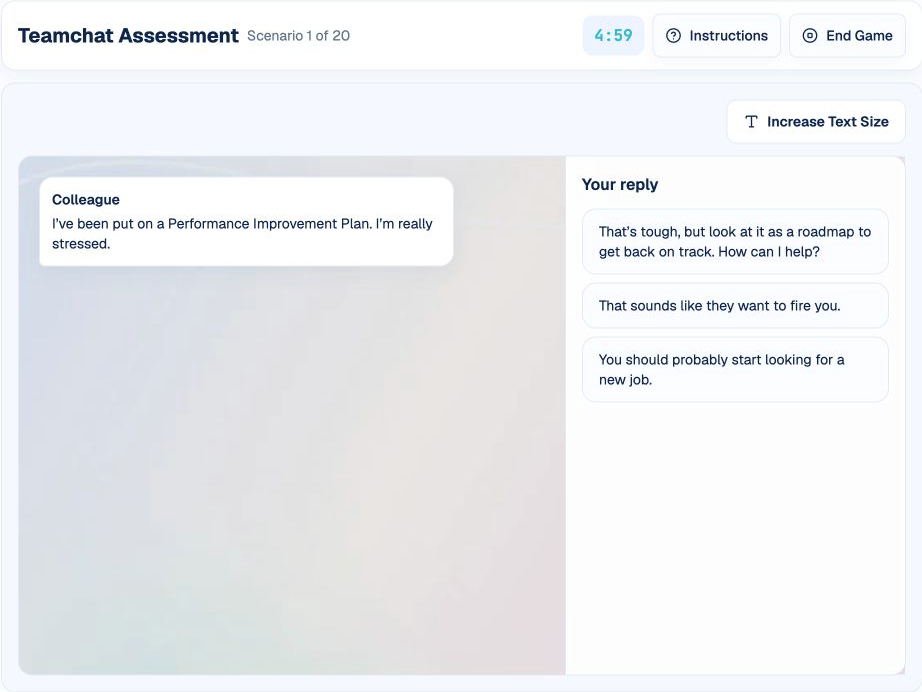
Teamchat presents workplace situations in a familiar messaging interface. The difficulty is not typing a reply; it is identifying the goal of the conversation and choosing the response that best reflects how you would communicate at work.
This guide follows HireVueGames' independent Teamchat practice. Familiarity cannot reveal an employer's preferred profile or guarantee an outcome, but it can help you understand the conversation flow and make more deliberate, context-aware choices.
What Is the HireVue Teamchat Game?
Teamchat is a simulated workplace communication assessment. Messages appear from a manager or colleague, followed by several reply options. Select the reply that best represents how you would respond, then watch the conversation continue.
Scenarios can involve planning, conflict, feedback, customer issues, deadlines, change, collaboration, or ethical decisions. Other assessment versions may use different situations, response options, timing, and scoring models.
What Does Teamchat Explore?
- Communication style: how clearly and professionally you respond.
- Teamwork and collaboration: how you support shared goals and colleagues.
- Interpersonal judgment: how you handle disagreement, feedback, or uncertainty.
- Problem-solving: whether a reply advances the situation constructively.
- Work-style preferences: how you balance initiative, empathy, boundaries, and accountability.
These are general characteristics of the format, not confirmed official employer score categories.
How the Teamchat Game Works
The independent round lasts five minutes and selects up to 20 randomized scenarios. A conversation opens with a message. When it is your turn, three response options appear. Select one, and subsequent messages are revealed until another response is required or the scenario ends.
The practice records each selected reply and response time. It does not display Correct or Incorrect, publish an answer key, or calculate an official teamwork score. A larger-text control is available for readability, and completed conversations move automatically to the next scenario.
1. Identify the Conversation Goal
Determine whether the situation requires information, a decision, support, conflict resolution, escalation, or a concrete action.
2. Read Tone and Context
Notice who is speaking, what has already happened, and how urgent or sensitive the situation is.
3. Compare the Consequences
Ask what each reply would cause next. Prefer the response that moves the work forward without creating avoidable conflict or ambiguity.
4. Choose and Follow the Thread
Select the reply closest to your real professional behavior, then use the next message as new context rather than treating every prompt in isolation.
How to Approach Teamchat Authentically
Be Constructive and Specific
A useful response usually acknowledges the issue and proposes a clear next step. Vague reassurance or criticism without action rarely advances the conversation.
Balance Assertiveness and Empathy
Direct communication can still be respectful. Supportive communication can still set boundaries and request accountability.
Match the Response to the Situation
A production incident may require immediate coordination, while a brainstorming discussion may benefit from openness and questions. One communication style is not optimal everywhere.
Protect Shared Goals
Consider the team, customer, safety, quality, and delivery impact rather than only personal convenience.
Avoid Performing an Ideal Persona
Role research can provide context, but selecting every apparently virtuous response may create an artificial or inconsistent pattern. Answer from your usual professional judgment.
Common Teamchat Mistakes
- Ignoring the conversation goal: produces a polite but irrelevant reply.
- Choosing the most forceful option by default: confuses assertiveness with aggression.
- Avoiding ownership: leaves the problem with no next step.
- Overpromising: commits to actions or timelines without enough information.
- Treating every scenario alike: misses differences in urgency, authority, and risk.
- Trying to decode a hidden ideal answer: the official model is not visible and may be role-dependent.
A Practical Teamchat Preparation Routine
Step 1: Name the Goal
Before each reply, summarize the conversation objective in a few words.
Step 2: Evaluate Outcome and Tone
For each option, ask what action it creates and how the recipient is likely to interpret it.
Step 3: Review Slow Scenarios
Notice whether conflict, ambiguity, leadership, or ethics causes the most hesitation. Use real workplace examples to clarify your normal approach.
Understanding Your Teamchat Practice Results
The independent history shows completed replies and response pace, not a pass score. Since the current practice has no official answer key, its result must not be interpreted as verified communication quality or employer fit.
Use practice to become familiar with multi-message scenarios and to reduce unnecessary hesitation. It cannot reproduce HireVue's proprietary behavioral model or tell you which response a particular employer prefers.
Practice the Teamchat Format
Use Teamchat practice to apply the goal-context-consequence-response routine in simulated conversations.
Related people-focused formats include the E-Motions guide, Portrait guide, and PortraitXT guide.
Disclaimer: HireVueGames is an independent preparation platform and is not affiliated with, endorsed by, or operated by HireVue. This guide describes independent practice and does not reproduce HireVue's proprietary questions, behavioral model, scoring system, or employer evaluation process. It is not an official HireVue assessment, exact replica, or score prediction tool.
Related Guides
E-Motions Guide
Use a repeatable method to compare facial-expression cues.
Read GuidePortrait Guide
Understand the picture-based work-style preference format.
Read GuidePortraitXT Guide
Approach statement ratings consistently and authentically.
Read Guide